
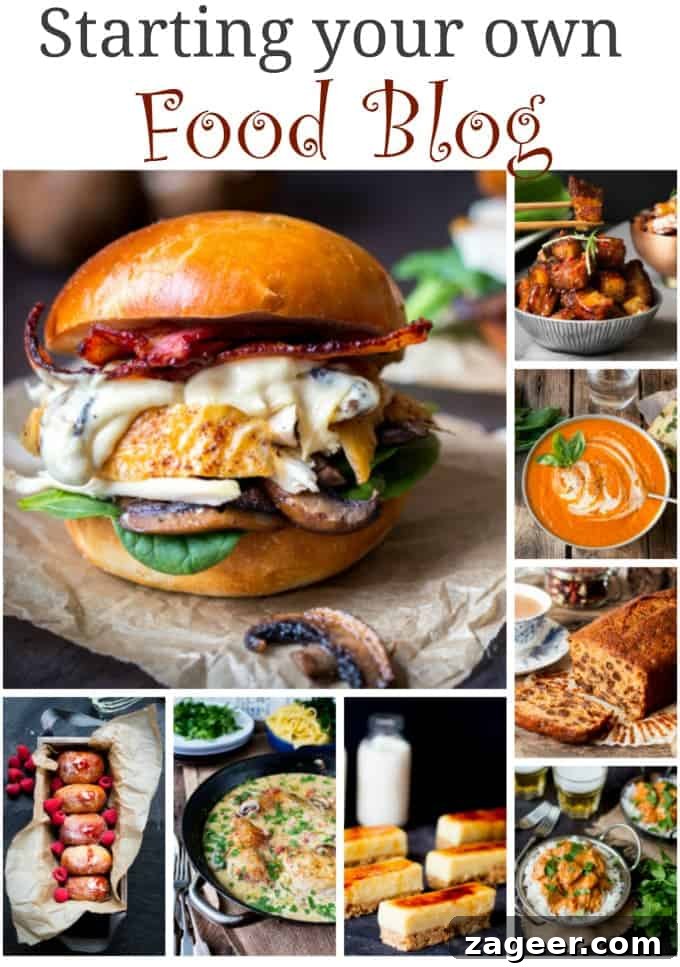
How to Start a Food Blog: Your Ultimate Guide to Launching a Culinary Journey
Embarking on the journey of starting a food blog can feel like navigating a complex culinary landscape, filled with countless questions and potential pitfalls. When I first dipped my toes into the world of food blogging 18 months ago, I faced a similar deluge of uncertainties. This comprehensive guide is designed to demystify the process, offering practical advice, valuable insights, and actionable steps for aspiring food bloggers.
While today’s focus isn’t a recipe, it’s about laying the foundational ingredients for your own successful culinary platform. My path has taught me invaluable lessons, transforming blogging from a hobby into a potential career. Though I don’t claim to be a definitive expert, my experiences have provided a deep understanding of:
- Crafting an engaging website design and user experience.
- Developing, writing, and photographing irresistible recipes.
- Leveraging social media for effective blog promotion and community building.
- Setting up a robust email subscription service to connect with your audience.
- Strategizing and implementing initial monetization efforts to grow your blog into a sustainable venture.
The learning curve in blogging is steep, with a myriad of skills to master. My most profound advice for anyone at the nascent stage of their blogging adventure is simple yet crucial:
BABY STEPS
The temptation to achieve perfection overnight, mimicking the polished appearance of established blogs, is strong. However, building a thriving blog is an organic process that demands patience and consistent effort. I’ve personally experienced the burnout of attempting too much too soon, leading to unnecessary stress and frustration. Instead, focus on perfecting the fundamentals, then commit to making one small, tangible improvement each day. Dedicate your full attention to that specific task, and you’ll witness your blog steadily evolve and blossom into something truly extraordinary.
This guide compiles information based solely on my personal journey, highlighting companies and services I’ve used and wholeheartedly trust. Consequently, I won’t be discussing platforms or providers I lack direct experience with, such as the Blogger platform or various alternative hosting services.
Throughout this post, I will include relevant links where appropriate. It’s important to note that a few of these are affiliate links. This means if you click through and sign up for a service, I may earn a small commission, at absolutely no additional cost to you. Your support through these links helps sustain Kitchen Sanctuary, and for that, I am incredibly grateful!
Today’s discussion will cover the following essential topics for aspiring food bloggers:
- Defining Your Food Blog’s Purpose
- Naming Your Food Blog: Crafting Your Brand Identity
- Hosted vs. Self-Hosted: Understanding Your Platform Options
- Choosing a Reliable Hosting Provider
- Selecting Your Food Blog Theme
- Enhancing Your Blog with Essential Plugins
- Recommended Resources for Aspiring Food Bloggers
- Future Content Ideas & Community Engagement
1. Defining Your Food Blog’s Purpose
Before diving into the technicalities, it’s paramount to articulate the core reason behind starting your blog. What drives this culinary endeavor? Are you looking to chronicle your personal recipes and cooking experiments? Do you wish to share innovative meal ideas with a wider audience beyond your immediate friends? Perhaps your passion lies in food photography, and you seek a platform to showcase your visual artistry. A blog can also be a powerful tool to track personal goals, such as a weight loss journey, or to document significant lifestyle changes like adapting to specific dietary requirements, such as gluten intolerance.
For many, the aspiration extends to earning an income from their blog, potentially transitioning into a work-from-home career. If financial gain is on your mind, either now or as a future possibility, understand that this path is challenging. At its heart, food blogging must be fueled by a genuine love for food and the joy of sharing. Any income should always be a secondary consideration. Launching a blog solely with monetization as the primary goal is, frankly, a recipe for failure – and your readers will quickly sense any lack of genuine passion.
Monetizing a blog is indeed a complex and often slow process. I began monetizing my blog less than a year ago. Despite attracting approximately 50,000 unique views each month, my monthly earnings at this stage primarily cover our grocery expenses. While this figure is steadily improving month by month, achieving a sustainable living wage through blogging requires significant time, dedication, and consistent effort.
That said, witnessing a steadily increasing income from pursuing something you love is incredibly rewarding. If you envision your blog eventually generating revenue, this ambition will significantly influence crucial decisions regarding your site’s setup and hosting. Planning for monetization from the outset can save you considerable effort and potential migration headaches down the line.
2. Naming Your Food Blog: Crafting Your Brand Identity
Finding the perfect blog name that hadn’t already been claimed was one of the most time-consuming aspects of my initial setup. The prospect of changing the blog name later, and the potential impact on branding and audience recognition, weighed heavily on my mind. Your blog’s name is its first impression, a crucial element of your brand identity.
To begin, grab a pen and paper and dedicate time to brainstorm a diverse range of ideas. Reflect deeply on the essence of your blog. What does cooking and writing about food genuinely mean to you? What emotions, memories, or sensations does it evoke? Consider if your blog will focus on a specific cuisine, dietary niche, or a particular type of food. Is there a personal memory, an object, or a concept that holds special meaning to you and could translate into a unique brand identity? For instance, my deep affection for retreating to the kitchen, viewing it as a sanctuary of comfort and warmth, directly inspired the name “Kitchen Sanctuary.”
Once you have a selection of potential names, head over to domain registrars like GoDaddy to check for their availability. It’s almost guaranteed that your initial favorites will be taken. Don’t be discouraged! This is part of the creative process. Keep your pen and paper handy throughout your day; inspiration can strike at any moment. Jot down any new ideas, then return to the domain checker. It took me a couple of days of iterative brainstorming and checking before I finally settled on “Kitchen Sanctuary.” Even then, I recall my former boss humorously remarking that it sounded like a place one would purchase kitchens!
When selecting a name, also consider its memorability, ease of pronunciation, and how well it reflects your content. A good blog name should be concise, brandable, and ideally, available as a .com domain for maximum credibility and global reach.
3. Hosted vs. Self-Hosted: Understanding Your Platform Options
One of the most fundamental decisions you’ll make when starting your food blog is whether to opt for a hosted or self-hosted platform. Understanding the distinctions is critical for your blog’s future growth and functionality.
Hosted Platforms
In a hosted solution, a service provider manages all the intricate backend infrastructure that keeps your website running smoothly. This includes server maintenance, regular backups, essential software upgrades, and most of the complex technical upkeep. These services are often provided for free, making them an attractive entry point for new bloggers. WordPress.com is a prime example of a popular hosted platform. Setting up a blog on WordPress.com is typically straightforward and intuitive, allowing you to get your site online in less than half an hour. I initially launched Kitchen Sanctuary in January 2014 on a free WordPress.com site, utilizing their Chateau theme.
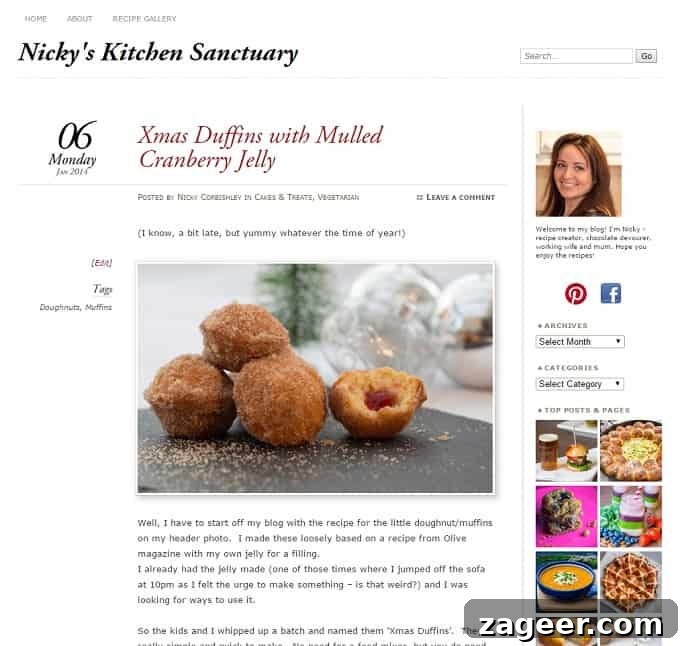
While this provided an excellent starting point, free hosted solutions like WordPress.com come with several notable limitations:
- Design Limitations: Although a variety of attractive free themes are available, once a theme is chosen, your ability to customize its design is significantly restricted. While changing themes is easy, I often found that while one theme offered a desired feature, it lacked others. For instance, I desperately wanted a simple image gallery of my recipes, categorized for easy browsing, but couldn’t find a suitable theme. My attempt to manually code this using HTML was disastrous, confirming my limited coding prowess!
- SEO (Search Engine Optimization) Challenges: SEO dictates how high your blog appears in search engine results (like Google) for relevant queries. While WordPress.com sites do appear in search results, self-hosted websites generally receive more favorable treatment from search engines dueating to greater control over SEO elements.
- No Plugin Support: Plugins are pre-written code snippets that add specific functionalities to your site. My desired image gallery for recipes? There’s a plugin for that, but it’s unavailable on WordPress.com. The inability to use plugins severely limits customization and functionality.
- Monetization Restrictions: Directly placing third-party advertisements on your site for income generation is typically disallowed. While WordPress.com offers its own ad program under specific conditions, revenue sharing with them means earning only a fraction of your potential. Generating more than a few dollars a month would require hundreds of thousands of views.
- Domain Name Structure: Free WordPress.com sites typically use a subdomain, such as `http://kitchensanctuary.wordpress.com`. For a more professional and memorable online presence, a custom domain (`https://www.kitchensanctuary.com`) is preferred. This requires purchasing the domain name separately (around $25-$30 annually from providers like GoDaddy) and mapping it to your WordPress.com blog, which is a relatively simple process.
Self-Hosted Platforms
With a self-hosted solution, you assume responsibility for managing the backend aspects of your site. This includes selecting and paying for your own web hosting, overseeing critical backups (essential to prevent loss of your hard work), and managing software upgrades. While this might sound daunting, it’s far less complex than it appears. Reputable hosting companies like SiteGround provide robust services that handle web hosting and automated backups for you. Many upgrades are often accomplished with a single click within your dashboard.
I transitioned to self-hosting after about six months, utilizing a guided transfer service to migrate from WordPress.com to WordPress.org. This service efficiently and smoothly moved my content. While I regretfully lost all the “likes” accumulated on WordPress.com (which the transfer team confirmed was unavoidable), all my comments and existing subscribers migrated successfully. The WordPress.org dashboard is remarkably similar to its .com counterpart, but with the crucial addition of more menu items, unlocking significantly enhanced control.
Since making the switch, I’ve gained far greater autonomy over my website. I can install any desired plugins, customize my site’s appearance with ease, and integrate advertising to generate income. I did experience a heart-stopping moment a few months ago when a coding experiment inadvertently crashed my website and locked me out of my dashboard – a stark reminder of my coding limitations! However, thanks to the reliable backup service, I was able to restore everything to normal without lasting damage.
When deciding between hosted and self-hosted, consider your long-term vision. If your primary goal is to blog for personal enjoyment, without immediate plans for intricate design features or monetization, a hosted platform is an excellent, low-barrier entry point. However, if you foresee your blog evolving into a business venture, self-hosting is the superior choice, offering unparalleled flexibility and control. Alternatively, you can follow my path: start with a hosted platform to build confidence and learn the ropes, then migrate to self-hosting once you’re more comfortable and ready to scale. While migration involves some effort, it prevented an early nervous breakdown from trying to tackle everything at once.
4. Choosing a Reliable Hosting Provider
A reliable hosting provider is the backbone of any successful self-hosted blog. After careful consideration and experiencing a previous host, I transitioned to SiteGround in November 2015, and I couldn’t be more satisfied with their service. My site’s loading speed saw a dramatic improvement, and their customer service stands out as truly exceptional.
SiteGround offers an incredibly useful live chat function. During my migration, a support staff member patiently stayed on the chat, ready to assist with any questions I had while completing the transfer information. The entire migration process was seamless, with absolutely no downtime for my website.
Even after the move was completed, I had a follow-up question regarding my email account. Expecting a drop in service quality once I was a committed customer, I was pleasantly surprised to find their support remained just as brilliant and responsive. This consistent level of excellent service is a testament to their commitment to customer satisfaction.
I am currently utilizing SiteGround’s GoGeek plan. Priced at approximately £9.75 ($14.75) per month, this plan is advertised as suitable for around 100,000 monthly visits. However, I’ve been advised that it can comfortably handle even higher traffic volumes. This reassures me that I won’t need to consider upgrading until my blog consistently exceeds 150,000 monthly visitors, providing ample room for growth.
When choosing a host, look for features like SSD storage for speed, free SSL certificates for security (essential for SEO and trust), daily backups, and scalable plans that can grow with your blog’s traffic. SiteGround excels in these areas, making them an ideal choice for food bloggers who prioritize performance, security, and exceptional support.
5. Selecting Your Food Blog Theme
Your blog theme is its visual identity, dictating its aesthetic appeal and user experience. It’s the first thing your visitors notice, and it significantly impacts how easily they can navigate your content. For my site’s design, I currently use the Foodie Pro theme. This theme allows for a good degree of customization, which is manageable even with minimal prior experience in website design.
The Foodie Pro theme operates on the powerful Genesis ‘parent’ theme, developed by StudioPress. Essentially, you acquire the Genesis Framework, which serves as the foundational architecture and provides all the core functionalities of your blog. Then, you install the Foodie Pro ‘child’ theme on top of this framework. The child theme is what gives your site its unique visual design and layout.
This parent-child theme structure offers significant advantages. The parent theme (Genesis) provides a robust, secure, and SEO-optimized framework. The child theme then builds upon this foundation, allowing for complete design flexibility without altering the core code of the Genesis Framework. This separation means that any necessary updates or security patches for the Genesis parent theme can be installed easily without affecting the custom design tweaks you’ve made to your Foodie Pro child theme. This prevents your customizations from being overwritten with every update, saving you considerable time and effort.
There is an extensive array of child themes compatible with the Genesis Framework, offering countless design possibilities to match any niche or aesthetic. For convenience, you can purchase both the Foodie Pro child theme and the Genesis parent theme together as a joint package directly from StudioPress. Investing in a high-quality, well-supported theme like Foodie Pro on Genesis ensures a professional appearance, optimal performance, and a user-friendly experience for your visitors, which are all critical for a thriving food blog.
6. Enhancing Your Blog with Essential Plugins
Plugins are invaluable tools for self-hosted WordPress.org blogs, essentially pre-written modules of code that extend your site’s functionality without requiring you to write any code yourself. They allow you to add features ranging from contact forms to advanced SEO capabilities. While there are thousands of plugins available, it’s crucial to select them wisely.
When searching for plugins, always ensure they are compatible with your current WordPress version (found in the ‘At a Glance’ section of your dashboard). Prioritize plugins with numerous positive reviews and a high number of active installations, as these metrics indicate reliability and widespread use. The Foodie Pro theme, in particular, works seamlessly with several popular plugins, with tutorials often available on the Foodie Pro site to guide you through their setup.
Here are my top recommended plugins that have significantly benefited Kitchen Sanctuary:
- Akismet Anti-Spam: This essential plugin provides robust protection against spam comments, a common nuisance for bloggers. It’s available for free with WordPress and is incredibly effective. Akismet has filtered out tens of thousands of spam comments on my blog, saving me countless hours of manual moderation. It’s a must-have for maintaining a clean and professional comment section.
- WP Recipe Maker Premium: For a food blog, presenting recipes clearly and appealingly is paramount. This premium plugin not only formats your recipes to be highly readable for your audience but also incorporates essential schema markup. This technical background work helps Google recognize your content as a recipe, significantly increasing the likelihood of your recipes appearing higher in search results, often with an enticing image, driving more organic traffic to your site.
- jQuery Pin It Button For Images: Pinterest is an incredibly powerful visual search engine and a massive source of traffic for food bloggers. This simple yet effective plugin allows readers to hover over any image on your blog, revealing a “Pin It” button. This encourages them to easily share your beautiful food photography and recipes on Pinterest, expanding your reach and driving valuable referral traffic.
- Yoast SEO: This is arguably one of the most critical plugins for any blogger serious about search engine optimization. Yoast SEO performs a myriad of magical, technical background tasks to dramatically improve your blog’s ranking in Google searches. After installing it, I observed a distinct and noticeable increase in traffic originating from search engines. It offers both a comprehensive free version and a more advanced paid version with even more features. With over 14 million downloads, its effectiveness is widely acknowledged, making it an indispensable tool for boosting your blog’s visibility.
Carefully selecting and configuring these plugins will equip your food blog with powerful functionalities, improve its discoverability, and enhance the overall experience for your visitors, setting the stage for long-term success.
7. Recommended Resources for Aspiring Food Bloggers
Beyond the technical setup, continuous learning and community engagement are vital for sustained blogging success. Here are some of the invaluable resources that have profoundly impacted my journey as a food blogger:
- Food Blogger Pro: This is an absolutely brilliant educational platform run by Bjork and Lindsey Ostrom from the highly successful blog, Pinch of Yum. Food Blogger Pro offers an extensive library of high-quality training videos covering every aspect of food blogging imaginable. Topics range from advanced food photography techniques and photo editing skills to mastering Google Analytics, understanding complex SEO strategies, and even creating professional eBooks. Beyond the video content, it boasts a vibrant community forum where you can connect with fellow bloggers, bounce ideas off each other, and get answers to your questions. There’s also an active Facebook group where members share Pinterest pins and collaborate on joint Pinterest boards, significantly boosting exposure. I’ve been a subscriber for several months, and it has been incredibly useful. It requires a subscription fee, payable either monthly or annually. Be sure to check this link for a potential discount code: Food Blogger Pro Membership Coupon.
- Tasty Food Photography: Another phenomenal resource authored by Lindsey Ostrom of Pinch of Yum. Food photography is perhaps the most critical visual element of a food blog, and this eBook is a game-changer. I purchased it and devoured it from cover to cover in a single sitting. It taught me an immense amount, providing clear explanations of complex camera settings and helping me dramatically improve the quality and aesthetic appeal of my food photography. It’s an investment that will pay dividends in making your recipes truly shine.
- How I Earned $40k in My First Year of Blogging: Written by Chelsea Lords from ‘Chelseasmessyapron.com,’ this eBook offers an inspiring and practical guide to monetizing your blog. Chelsea’s success in blogging is truly remarkable, and her advice is incredibly insightful. I bought her book after my first year of blogging and found her strategies invaluable. My only regret is not discovering it sooner, as it could have accelerated my monetization efforts considerably. It provides a transparent look at the possibilities of generating significant income through a food blog.
These resources offer a wealth of knowledge and support that can propel your food blogging journey forward, equipping you with both practical skills and a motivating community.
8. Future Content Ideas & Community Engagement
I sincerely hope you found this comprehensive guide beneficial, despite its length. My aim was to provide a thorough overview to help you navigate the initial complexities of launching your food blog. If this information resonated with you and proved useful, I’m considering developing a mini-series of posts to delve deeper into specific aspects of blogging. Potential topics for future articles include:
- A Step-by-Step Blog Setup Tutorial: A detailed walkthrough from registering your domain to publishing your very first blog post.
- Photography Basics for Food Bloggers: While I’m continually learning myself, I’ve gathered valuable tips and techniques that can help beginners elevate their food photography.
- What to Expect in Your First Year/18 Months of Blogging: A transparent look into my own blog’s statistics, illustrating how traffic and engagement have grown since Kitchen Sanctuary launched in January 2014.
- Income Reports: Detailed insights into my earnings, either from the present or retrospectively from when Kitchen Sanctuary began generating income in September 2014.
- An Overview of Photo Sharing Sites: An analysis of the various platforms I use, such as Instagram, Flickr, and Pinterest, and their individual impact on my blog’s traffic and statistics.
- Essential Tools I Use: A deep dive into my favorite blogging tools, including my preferred Pinterest scheduling tool, Tailwind, and other efficiency-boosting software.
Your feedback is incredibly valuable! If there’s a particular topic or aspect of food blogging that you’re eager for me to cover in more detail, please don’t hesitate to let me know. You can share your suggestions in the comments section below or reach out to me directly via email at [email protected]. I’m here to support your blogging journey and help you build a thriving online presence.
Please note: Some of the links embedded in this post are affiliate links. This means that if you choose to purchase a product or service through these links, I may receive a small commission. Rest assured, this comes at no extra cost to you whatsoever. Your use of these links is greatly appreciated, as it helps me to continue running and maintaining Kitchen Sanctuary, bringing you more helpful content and delicious recipes. Thank you for your support!